
FASHION CUSTOMER OPERATIONS
From a fashion enquiry to a useful stylist conversation.
An anonymous Indian custom-fashion project overview: conversational product recommendation, lead qualification, cross-channel automation, handoff workflows and supporting administration. Explore the workflow and a dashboard frontend demo below.
Looking for something for a haldi.
Let's find the right fit for the occasion.
- Occasion
- Haldi
- Budget
- Shared
- Handoff
- Stylist queue
Fictional conversation and interface illustration. No customer data shown.
THE WORKFLOW PROBLEM
Fashion enquiries carry context an FAQ can miss.
Consider a customer asking for an outfit for a haldi, a couple outfit within a budget or a custom colour for an event. Occasion, preference, timing and product fit all matter. A useful design needs to preserve that context when a stylist takes over.
The scope above is owner-confirmed. The artifact below demonstrates the dashboard frontend with synthetic records; backend automation, live messaging and production deployment have not been verified in this review. The journey diagram explains the proposed flow. No customer endorsement or numerical performance claim is made.
PROPOSED CUSTOMER JOURNEY
Prepare the context for the next conversation.
Capture the enquiry
Start with the customer’s actual requirement.
Collect context
Ask about occasion, budget, preferences and timing.
Explore product fit
Use approved catalogue information where available.
Pass to a stylist
Carry the requirement summary and unresolved questions.
Product recommendations, pricing and availability would depend on the approved source data and integration scope. Custom orders and delivery commitments need explicit rules and a person responsible for exceptions.
HUMAN DECISIONS
Keep stylist judgment visible.
Custom requirements, urgent enquiries, image-led questions and uncertain product matches are useful scenarios for evaluating a handoff. Define who receives the request, what they see and how the customer knows a person is needed.
A requirement summary, an owner and an unresolved question make the next action concrete.
DASHBOARD DEMONSTRATION
Inspect the interface behind the workflow.
The actual dashboard frontend brings requirement summaries, classification and stylist queue state into a reviewable view. The local demonstration showed column selection, a search with synthetic enquiries and the requirement-detail form.
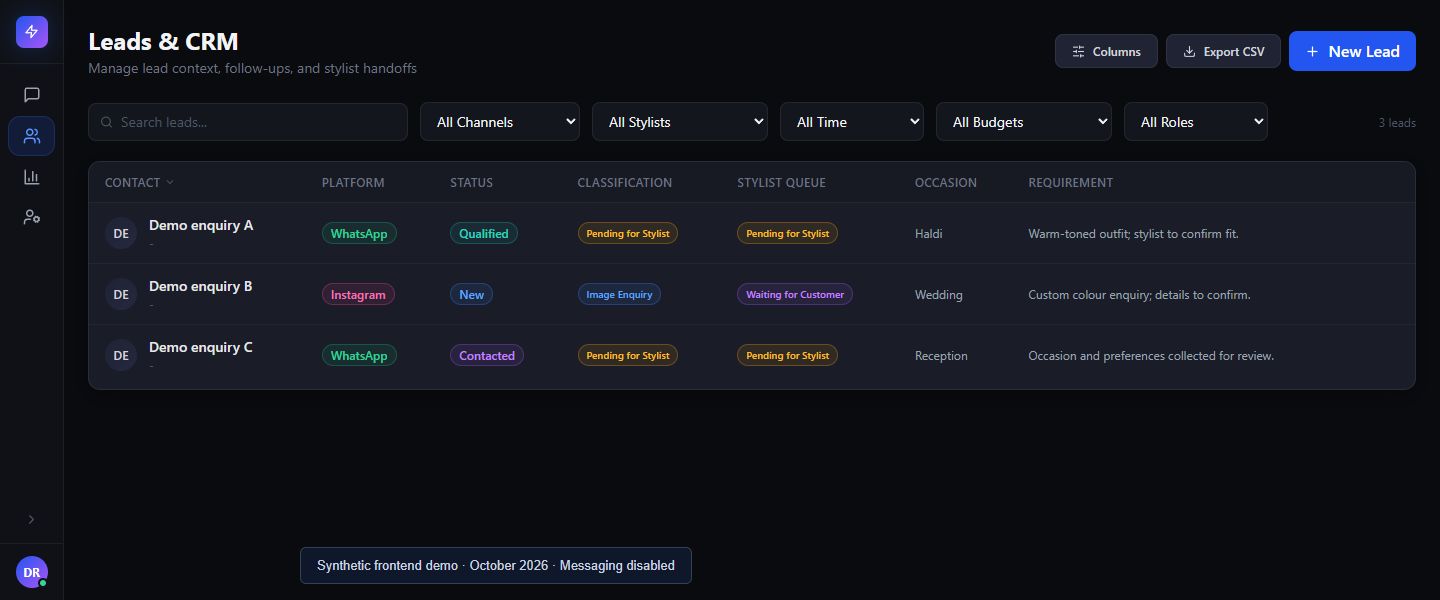
This capture verifies the frontend view. It does not establish backend execution, pilot or production status, live channel connectivity or business results.
BEFORE A BUILD
Turn the design into checkable requirements.
What the demonstrated architecture establishes
The reviewed frontend separates enquiry lists, requirement details and queue presentation from the data transport adapter. The isolated demonstration supplied synthetic responses through that adapter and disabled messaging. Column selection, a search returning a sample enquiry and opening the detail form were observed. This is qualitative interface validation, not proof that source-system filtering, AI classification or assignment executes on a backend.
Constraints before release and adoption
Channel permissions, catalogue freshness, duplicate identity, sensitive enquiry access and stylist capacity need explicit decisions. A release evaluation would need approved representative records, normal and failed handoffs, access tests, a rollback owner and staff acceptance. Actual release, adoption, training, ongoing operations and integration evidence are not available in this overview.
Evaluate representative enquiries, missing product data, returning-customer context, duplicate requests and failed handoffs. Confirm access permissions, data retention, supported channels and who handles failures before agreeing an implementation scope.
Scope, acceptance and running costsPrepare the data, reviewers and handover responsibilities before treating the proposed journey as an operating system.